
Wallet
The recovery phrase behind your account is also a wallet, for Ethereum and the chains built on it, for Bitcoin, and for Solana. The wallet is a plugin, off on a fresh install. Turn it on under Settings → Plugins and a Wallet chat appears in your chat list.
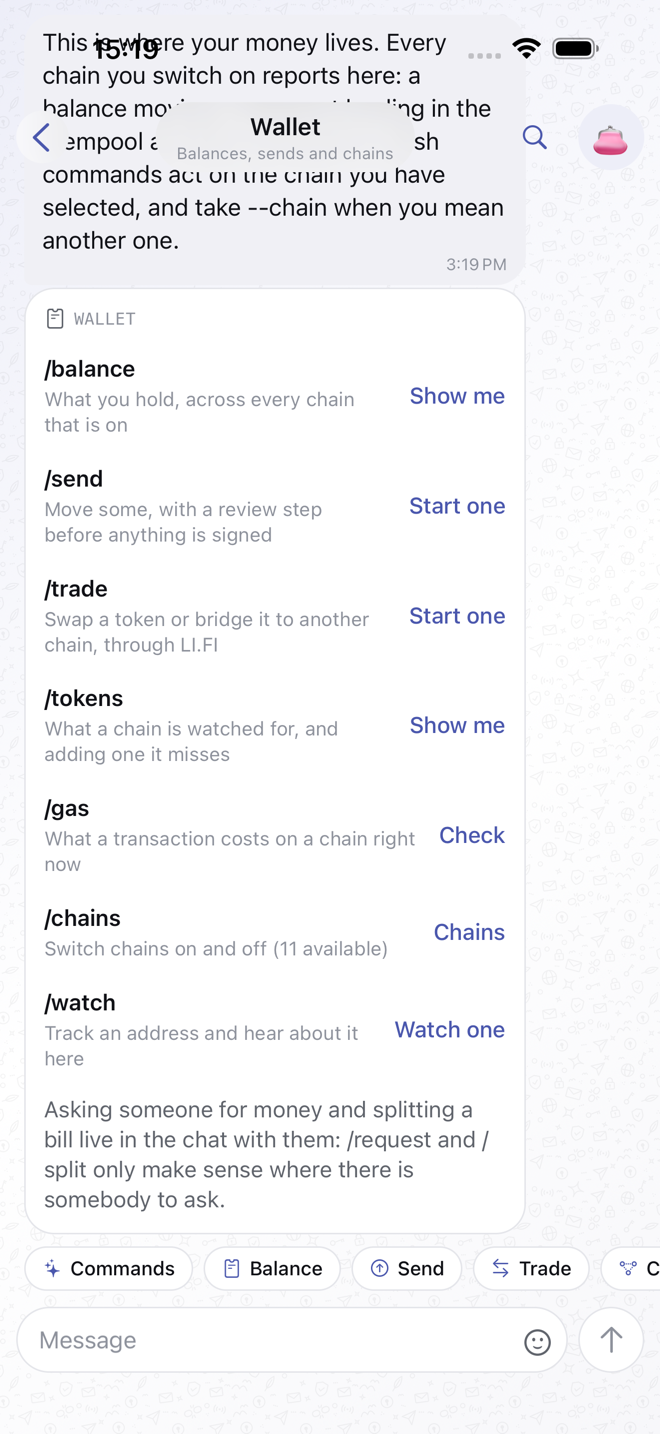
Everything the wallet does is a slash command, run either in its own chat or in the chat where money came up. The chips above the composer run the common ones.
Not a custodian
The app holds no funds, runs no exchange and takes no fee. Keys are derived on the device from your phrase and never transmitted. Transactions go from the device straight to a public blockchain endpoint.
Chains
/chains lists the chains, switches them on and off, and picks the default.
Ethereum, Base, Optimism, Arbitrum and Polygon are the EVM side; Bitcoin and
Solana are their own. Sepolia, Base Sepolia, Optimism Sepolia and Arbitrum
Sepolia are there for testing and say so on every card, because their coins are
worth nothing.
Every slash command uses the default chain unless you add --chain bitcoin, or
base, solana, and so on.
Balance
/balance shows your balance on the default chain. /balance vitalik.eth or
/balance 0x… looks someone else up. The card carries the address, the amount
and a link to the block explorer.
Token balances come from a list of 829 tokens bundled with the app, the Uniswap Labs Default list from tokenlists.org. The app asks each of those contracts what you hold, in one batched call to the endpoint it is already using, so nothing about your addresses reaches a third party and there is no key to enter.
/tokens says how many are watched on a chain. For one the list does not
carry, /tokens add <contract address> reads its symbol and decimals from the
contract and watches it from then on; /tokens remove drops it again.
Solana needs none of that. One call returns every token the address holds, with
the amount, so /balance --chain solana lists them all. A second bundled list,
Jupiter's verified one, only puts a name to a mint; anything it does not know
shows its mint address instead. Sending a Solana token is not implemented yet;
only SOL itself.
Send
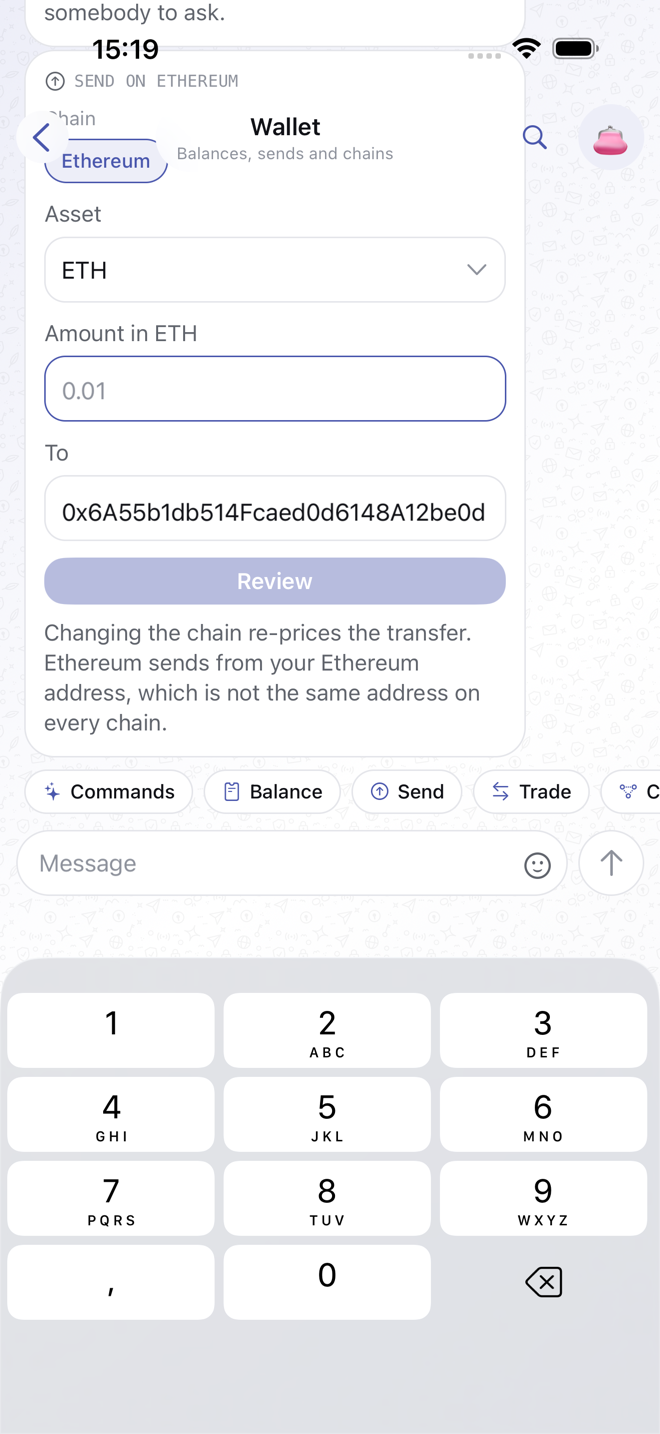
/send 0.01 vitalik.eth, or just /send and fill in the form. Pick the
chain and the asset, enter the amount and the recipient, and tap Review.
The review shows exactly what will be signed (amount, recipient, fee), and
nothing is signed until you confirm. Hardware accounts confirm on the device.
Sending inside a chat with the person is the natural way to do it: the address
is already there. In a group, /split 30 dinner asks everyone for their share.
Swap and bridge
/trade 25 usdc eth quotes a swap and shows what you would get. /swap and
/bridge are the same slash command under other names. It works between the EVM
chains you have switched on: Ethereum, Base, Optimism, Arbitrum, Polygon.
Bitcoin and Solana are not part of it.
Stay on one chain for a swap, or add --from base --to arbitrum to move a
token across. /trade on its own opens a form with the chains, the assets
you hold and the amount.
The review card says how much you receive, the least you would accept if the price moves (0.5% slippage), which route it takes, how long that route usually needs, and both the gas and route fees. The quote is taken again when you confirm, so the amount can shift a little with the market, and nothing is signed until then.
Letting the router take the token costs no transaction in most cases. A
token that understands permit, which covers USDC and many newer ones, is
released by a signature made on your device, for that amount and half an hour
only. Any other
token goes through Uniswap's Permit2, which needs one approval the first time
you trade it and never again; after that each trade is a signature too. The
card says which of the three applies before you confirm, and an approval that
is needed appears as its own message with a link to follow it.
A trade lands in your own address, which is the same address on every EVM
chain. To send the result elsewhere, fill in Recipient on the form or add
--recipient 0x… (an ENS name works). The review then says where it lands:
the address goes out with the quote rather than being left to a default.
A bridge takes a few minutes to arrive. The card confirming it has a Check
status button, and the same question later is
/trade --status <transaction> --from base --to arbitrum. Both say how far
along it is and link to the transaction on each side.
Quotes come from LI.FI, which sees the address, the tokens and the amount you ask about. No key is needed; the free rate limit is per device. Your own LI.FI key, entered under Settings → Trades, raises it. As with every other key, none ships with the app.
Request
/request 20 lunch posts a card asking the other person to pay you. They tap
it, review it, confirm; you see the payment arrive. The request carries your
address for that chain, so it works across chains.
Watch an address
/watch vitalik.eth keeps an eye on an address you do not own. When its
balance moves, the Wallet chat posts a card: how much, the new balance, and a
button to the explorer. /unwatch stops, /watched lists them. Your own
address is always watched.
Connect a site
The Browser plugin opens dapps in your system browser and connects them
back to this wallet over WalletConnect. /open uniswap opens a bookmark;
/scan reads a WalletConnect code; when the site asks for a signature, the app
shows a review sheet and signs only when you confirm. /connected lists open
sessions, /disconnect closes one, and /bookmark adds a site of your own.
Bookmarks ship for Uniswap, CoW Swap, 1inch, Matcha, SushiSwap, Curve, Aave, OpenSea, Etherscan and Mirror.
Links open in the system browser rather than inside the app on purpose: an in-app browser would lose the page the moment you came back here to approve the request.
Gas, explorer, your own node
/gas shows the current fee. /explorer opens an address on the chain's block
explorer. /rpc https://… points a chain at an endpoint you run or pay for,
instead of the public one. That endpoint sees which addresses you look at, and
the app says so before you set it.