# Protocols
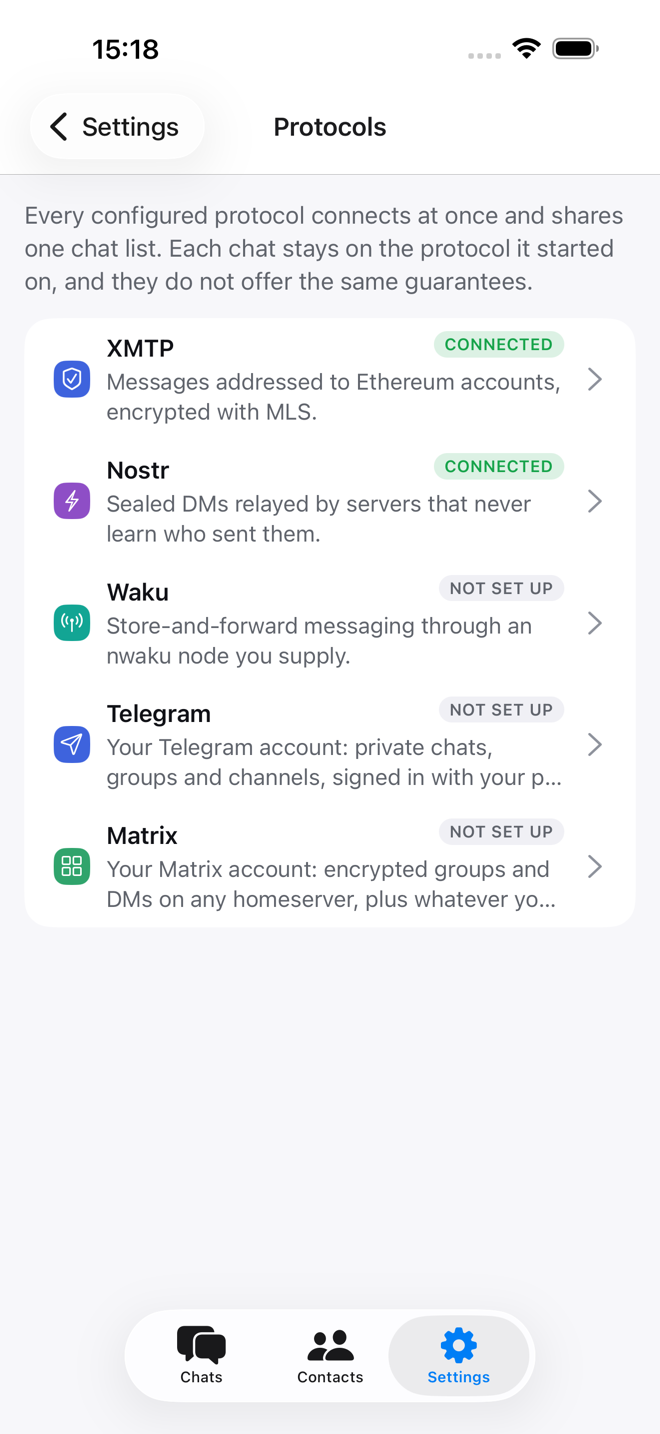
Every chat runs over one protocol. The app tells you which, and what that
protocol protects, on the chat itself and in full under **Settings →
Protocols**, where each one is set up.
Settings → ProtocolsEach protocol says what it protects before you connect
## At a glance
| Protocol | Who can read your messages | To reach someone you need | History on a new device |
| --- | --- | --- | --- |
| **XMTP** | Only the people in the chat. Relays see that two inboxes talk, not what they say. | An Ethereum address or ENS name that has opened an XMTP app | Comes back from its nodes |
| **Nostr** | Only the participants. Relays see who receives a message and when, never who sent it. | A public key (`npub…`) | Only what your relays still hold |
| **Status** | Only the participants. The nodes you go through see which topics you read, not the content. | A chat key (`zQ3sh…`) or a `status.app` link | Only what the store nodes still hold |
| **Telegram** | Telegram. Not end-to-end encrypted, same as the official app. | A `@username`, a `t.me` link, or a phone number in your contacts | Yes, from Telegram |
| **Matrix** | Only the chat's members, in chats with encryption on. The homeserver sees who talks to whom and when. | `@user:server` or a `matrix.to` link | Yes, from the homeserver; encrypted chats also need the keys |
XMTP, Nostr and Status work the moment your account exists, because your
recovery phrase holds your keys for them. Telegram and Matrix are accounts you
already have elsewhere, so you sign in to them.
Unread badges use each protocol's available history. Telegram and Matrix report
their own counts; for XMTP, Status and Nostr the app counts the messages it has
since you last read the chat.
## XMTP
Messages between Ethereum accounts, encrypted with MLS. Groups work, and the
protocol itself enforces who is a member. The other person must have opened an
XMTP app at least once; if they have not, the app says so when you try to start
the chat.
### Set up
Nothing to set up. Two settings are there if you need them:
- **Settings → XMTP environment** switches between the production environment
and the developer one. Two apps only see each other on the same one.
- **Settings → Devices** lists the phones and computers that share your inbox,
and revokes one you no longer have.
### What works
- DMs and groups. Group details show the description, image and member count
when they are set.
- On phones, you can delete a message you sent. Deleting asks other apps to
hide it; copies already held by nodes or other participants stay.
### What it does not do
- On the desktop, deletions from others show, but you cannot delete your own
messages yet.
- There is no list of public groups, and no admin-only posting.
- There is no join-by-link in XMTP itself. Invite links need a separate app
service.
## Nostr
Sealed DMs (NIP-17): relays deliver them without learning who sent them.
### Set up
Under **Settings → Protocols → Nostr** you choose the relays, one per line. The
defaults are public ones. More relays means better delivery, and also more
servers that see when you receive something.
### What works
- DMs, and groups with a fixed set of participants, both over NIP-17.
### What it does not do
- Relays may drop messages or forget history, so a new device only sees what
your relays still hold.
- NIP-17 groups have no public identifier and no admin moderation.
- NIP-29 relay groups are a different protocol, and are not supported.
- NIP-17 allows asking for a message to be deleted, but the app does not send
or act on those requests yet.
## Status
DMs and groups with people who use the [Status](https://status.app) app, over
the Status network. Statim speaks Status's own chat protocol. Communities are
not supported.
### Set up
Nothing to set up. Your Status identity comes from your recovery phrase the
same way the Status app derives it, so importing the phrase you use in Status
makes you the same person in both apps.
**Settings → Protocols → Status** shows your address, the `zQ3sh…` chat key
Status users add you by. You can also set a **Display name** there, which
Status users see instead of your chat key. It must be 5 to 24 letters, digits,
spaces, `_` or `-`: Status drops every message whose sender name breaks those
rules, so the app will not connect with such a name. Tap **Save and
reconnect** after changing it.
### Starting a chat
Your first message goes out as a Status contact request, which is how the
Status app decides to show a chat at all. Until they accept, it waits in their
notifications. A contact request from a Status user arrives under
[Requests](https://statim.laibe.cc/guide/chats.md#requests), and accepting it adds them back.
### Groups
Status groups are a signed log of membership changes that every member checks.
- You can only add people who accepted your contact request.
- The creator is the group's owner and adds or removes people.
- Any member can rename the group, and anyone can leave.
- An invitation from someone you have not added waits under Requests.
### What works
- Replies, mentions, reactions, photos, voice notes, edits and deletions, both
ways.
- You can edit your own text and captions, delete your own messages for
everyone, and delete any message for yourself only. Group admins can delete
other people's messages.
- Profile pictures and group pictures set in Status show here too.
### What it does not do
- Stickers from Status show as a line saying what they were.
- There are no polls, pins or presence.
- If the same recovery phrase is also in the Status app, a contact's messages
reach Statim only after Statim has written to them, and the two apps do not
share history.
### Encryption
The messages you send are encrypted to the other person's chat key with a
one-off key per message, so they have no forward secrecy. Once you have written
to someone, their Status app encrypts its replies to this device with a Double
Ratchet, and Statim follows it.
### Using your own node
Statim reaches the Status network through Status's own nodes, as the Status app
does. It asks them for the messages addressed to you, hands them yours to pass
on, and fetches what arrived while it was closed. Those nodes see your network
address and which topics you follow, never what the messages say.
To go through a node you run instead, start nwaku on the Status network
somewhere your phone can reach, and enter its REST address
(`http://your-host:8645`) as the **Status node URL**:
```bash
wakunode2 --cluster-id=16 --shard=32 --relay=true \
--dns-discovery=true --discv5-discovery=true \
--dns-discovery-url=enrtree://AMOJVZX4V6EXP7NTJPMAYJYST2QP6AJXYW76IU6VGJS7UVSNDYZG4@boot.prod.status.nodes.status.im \
--storenode=/dns4/store-01.do-ams3.status.prod.status.im/tcp/30303/p2p/16Uiu2HAmAUdrQ3uwzuE4Gy4D56hX6uLKEeerJAnhKEHZ3DxF1EfT \
--max-msg-size=1024KiB --rest=true --rest-address=0.0.0.0 \
--rest-relay-cache-capacity=1000
```
That node relays every Status DM and group on its shard, a few messages a
second, and hands the app what is addressed to you. Keep `--max-msg-size`:
Status sends photos inline, up to 1 MiB, and nwaku drops anything over 150 KiB
by default.
## Telegram
Your own Telegram account, in the same chat list: DMs, groups and channels.
Telegram works everywhere except Android.
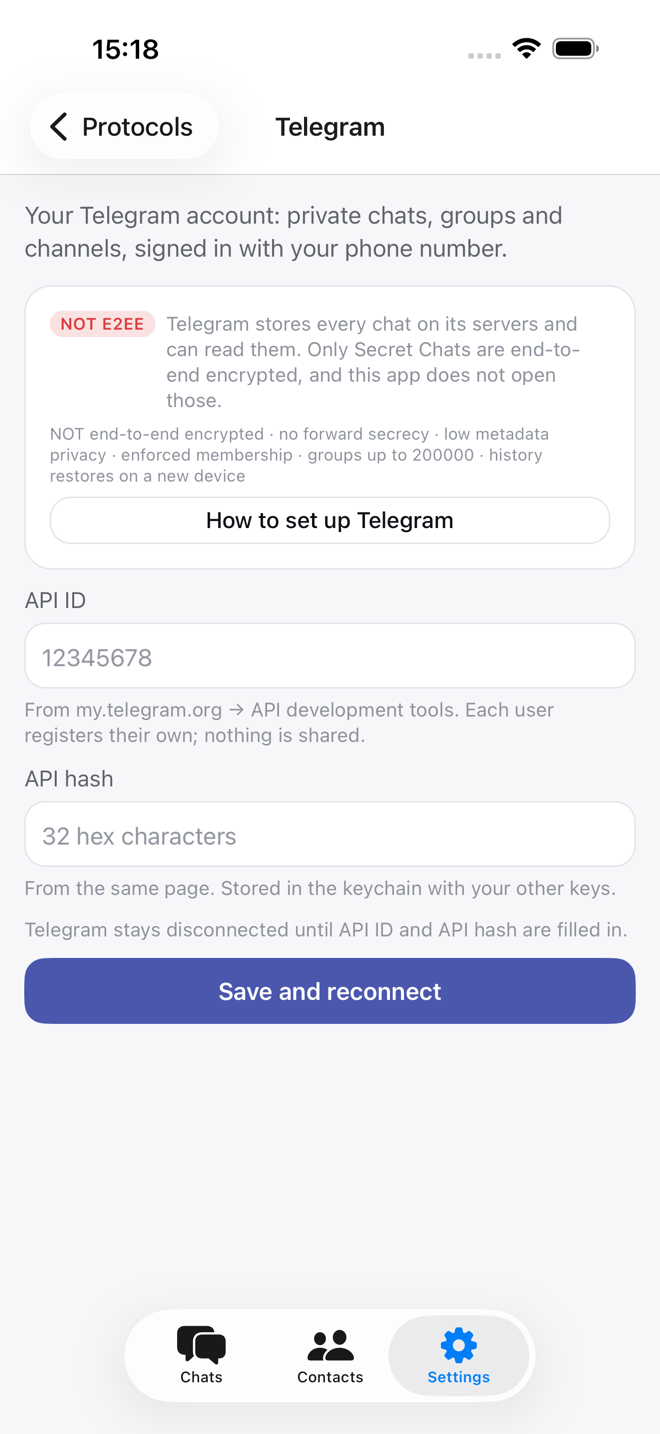
> **Not end-to-end encrypted**
>
> Telegram's servers hold and can read these chats, exactly as with the official
> app. Secret Chats are not opened here. Every Telegram chat says so.
### Set up
Telegram asks for your own API credentials
1. Get an **API ID** and **API hash** at [my.telegram.org](https://my.telegram.org)
→ *API development tools*. Telegram issues every developer their own pair.
This app ships none, so each person registers theirs; it takes a minute and
nothing about it is shared.
2. Enter both under **Settings → Protocols → Telegram** and tap **Save and
reconnect**.
3. The screen then asks for your **phone number**, the **code** Telegram sends
to your other devices or by SMS, and your **two-step verification password**
if you have one.
You appear in Telegram's *Active Sessions* like any other client. **Sign out**
on the same screen ends the session there and deletes Telegram's data from this
device.
### Messages
- Replies, reactions, photos, video, files and voice notes.
- You can edit your own text, delete a message for everyone when Telegram
allows it, and delete any message for yourself only. Group admins can delete
other people's messages.
- Pin messages where the chat allows it, and open the pinned list from the top
of the chat.
- Polls show their results and let you vote. Where you can post,
`/poll "Question" "First choice" "Second choice"` creates an anonymous
single-choice poll.
- Search works in one chat or across chats, and Telegram searches its own
history. Other protocols search only the messages the app has stored or
loaded.
- In groups, typing `@` suggests members, with or without a username. The
Mentions filter shows chats with unread Telegram mentions or replies.
- DMs show typing, and online or last seen.
- Drafts and chats marked unread are saved to your Telegram account, so they
follow you to your other devices.
### Groups and channels
- Channels are read-only for members; administrators post.
- Group and channel details show the description, link, photo and member count
when Telegram provides them.
- To join a public group or channel, paste its @username or t.me link in **New
message**, look at the preview, then join.
- Private invite links preview there too. A link that needs approval sends a
join request instead of opening the chat.
### For administrators
- Create invite links, plain or needing approval, from the details screen.
- Approve or decline join requests on the same screen. The chat's title bar
counts them as they arrive.
- With the right to restrict members, set slow mode in group details, and
mute, remove or ban a member from their profile.
## Matrix
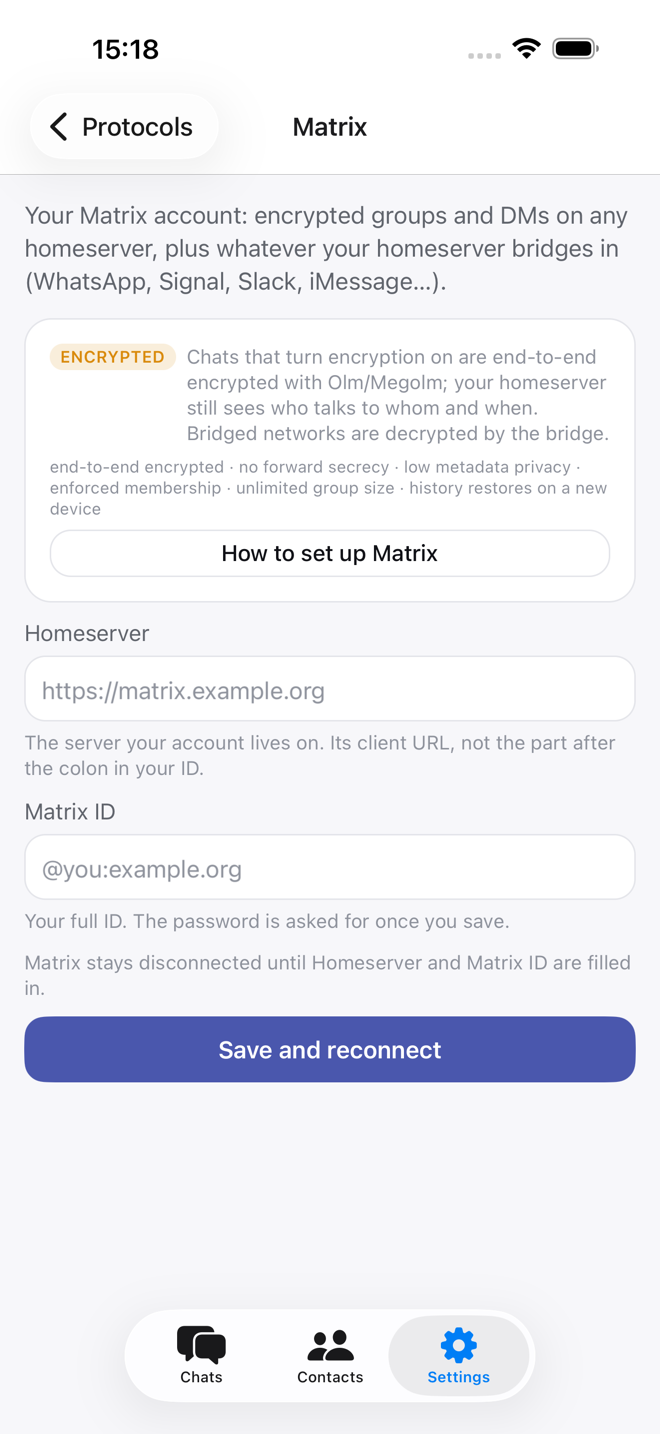
Your own Matrix account: encrypted groups and DMs on any homeserver, plus
whatever that homeserver bridges in. See [WhatsApp, Signal &
friends](https://statim.laibe.cc/guide/bridges.md).
### What your homeserver needs
Check two things with whoever runs it:
- It must support **sliding sync** (Synapse 1.114 or newer, or the Conduit
family). Element X needs the same thing.
- Sign-in must be by **password**. Servers that only offer a web sign-in, as
matrix.org now does, are not supported yet.
### Set up
1. Under **Settings → Protocols → Matrix**, enter your **homeserver** URL (the
server's address, such as `https://matrix.example.org`) and your **Matrix
ID** (`@you:example.org`), then **Save and reconnect**.
2. Enter your **password** once. The app keeps a session token, not the
password.
Invitations arrive as [requests](https://statim.laibe.cc/guide/chats.md#requests); accepting one joins the
chat.
### Encryption
Chats with encryption on are end-to-end encrypted. A message sent before this
device joined shows as waiting for its keys. That is how Matrix encryption
works, not a fault.
### Messages
- Edits, deletions, pins, mentions, typing, video and polls.
- Where you can post, `/poll "Question" "First choice" "Second choice"`
creates a poll.
- DMs show online or last seen when the homeserver shares it.
- Search reaches the homeserver's history for chats without encryption.
- Chats marked unread are saved to your Matrix account.
### Groups and channels
- Chat details show the description, picture, link and member count.
- Who may post comes from the chat's Matrix power levels. A group where only
some members post shows as a channel, with a read-only composer for the rest.
- Paste a group's address (`#name:server`), ID or matrix.to link in **New
message** to preview it. Public groups can be joined; groups that take
requests get a join request from you.
- A preview of a group you have not joined always says "Group", because who
may post is only known after joining. Once you join, it says "Channel" if
only some members post.
### For administrators
- Create an invite link. A link that needs approval lets people ask to join,
and their requests wait under **Join requests** in the chat's details.
- Mute, remove or ban a member. Muting lowers the member's power level below
what sending needs.
### Bridged chats
In a chat bridged to another network, everything above is what Matrix can do.
The bridge has to carry each action to the network at the far end, and what it
carries depends on the bridge, how it is set up and that network's API. A
Matrix poll, for example, may stay on the Matrix side without becoming a poll
on the other network. See [bridges](https://statim.laibe.cc/guide/bridges.md).